Solving Trivy issues by changing container registries
A chronicle of transient problems

Hello, let me tell you a story about Trivy.
On my current company we have a step in our pipelines to scan vulnerabilities in Docker images using the Azure DevOps Trivy extension. This week we started having some issues like this:
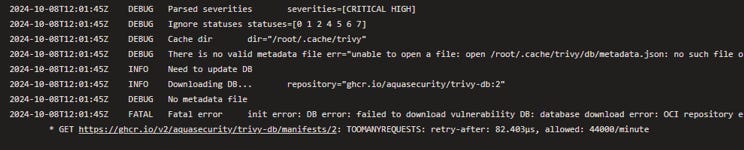
I didn’t bother understanding the error too much at first, but then it started appearing more and more often so we had to dig deeper. Based on the message it seemed that:
Trivy is trying to update a vulnerability database each time it runs the analysis
The database is hosted in the URL ghcr.io/aquasecurity/trivy-db:2 (this is important!)
The task fails because it can’t update the vulnerability database, so this has nothing to do with the image scan itself
The error we get is a TOOMANYREQUESTS trying to download the database, and apparently we have 44000 requests per minute (a lot!)
The TOOMANYREQUESTS is very clearly a message for API rate limiting so I thought we hit some kind of plan quota initially. I didn’t give much mind to the limit of requests per minute which was really large compared to our actual usage.
I thought about following the trail of API rate limiting, so I ended up in the GitHub API docs which state:
The primary rate limit for unauthenticated requests is 60 requests per hour.
[…] (Authenticated) requests count towards your personal rate limit of 5,000 requests per hour.
This seemed like a good solution, all we needed was to generate a GitHub token and pass it as an environment variable for the pipelines that used Trivy. I started setting up a testing scenario for this when I stumbled into another very revealing discussion on Trivy’s GitHub:
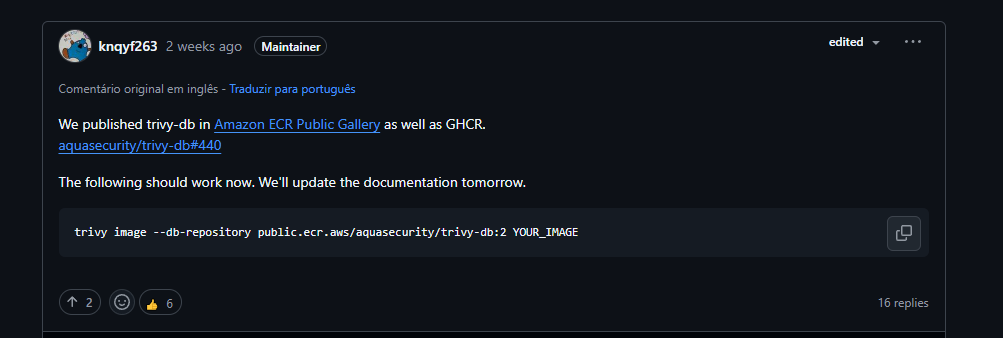
Apparently the rate limiting was on Trivy’s side and this was a generalized issue, which prompted them to duplicate their images from GitHub Container Registry to Amazon’s Elastic Container Registry as well, and the fix was as simples as adding an additional flag to the Trivy task!
The token idea was still on the back of my mind but I went ahead, tried adding te —db-repository flag on my failing pipeline and all of a sudden it worked! And consistently nonetheless!
My trivy task ended up looking like this:
- task: trivy@1
    displayName: 'Scan image vulnerabilities'
    inputs:
      image: my.azurecr.io/${{ parameters.imageName }}:${{ parameters.version }}
      loginDockerConfig: true
      severities: CRITICAL,HIGH
      ignoreUnfixed: true
      exitCode: 0
      debug: ${{ parameters.debug }}
      # fix for https://github.com/aquasecurity/trivy/discussions/7538
      options: |
        --db-repository public.ecr.aws/aquasecurity/trivy-db:latest
So that’s it! For now I believe this solved the issue but I’ll still keep an eye out for any more Trivy errors. It was also a relief that I didn’t have to put a GitHub token on the pipeline because Azure DevOps doesn’t deal well with secrets on pipeline templates.